
v0.0.7 hooks for 7 coding agents
Rewind to any step. Let another agent take it from there.
rewindagents records every step your coding agent takes and saves each file before it changes. Fork any recorded step, let another agent or a person continue from there, and compare the runs on what they changed and on your own check.
Undo is the base it stands on: rewind the working tree to any step, within the limits.
$ rewindagents fork 2 --name clamp
  2 files as they were right after step 2 of session demo-0001; git worktree on branch rewindagents/run/clamp
$ rewindagents compare --check "python3 test_cart.py"
runs from session demo-000 step 2 of shop (2 files at the start)

  run       agents         steps  files  lines                 check
  shop      claude             1      1  +1 -1                 FAIL (exit 1)
  clamp     -                  0      1  +1 -1                 pass

  file     shop         clamp
  cart.py  changed A    changed B
What ux-review/try-runs.sh printed against an installed build, unedited; lines naming its temporary folder are left out. shop is the agent's run, recorded through the real hook; clamp is a second attempt made by hand in the fork. A test runs the script again and fails if a line here changes; see Tested.
- standard library only
- no network, no account
- never stops or changes a call
- Apache-2.0
Install. Not on PyPI yet, so from GitHub; then add the hook in a project. One click on a command selects all of it, without the prompt.
$ pipx install git+https://github.com/Johnbjoseph-cybersec/rewindagents
# or: pip install git+https://...
# adds the hook to .claude/settings.json in this project
$ rewindagents install Claude Code
- Codex
 Cursor
 Gemini CLI
 GitHub Copilot
- Factory Droid
 Qwen Code
01Fork and compare
Rewind to a step, fork it, compare.
Rewind to any step, fork it, let another agent take it from there, compare. A recorded step is a starting point you can hand to another agent, another model, another prompt or a person, and the runs that follow can be compared on what they actually did to the files and on your own check.
Fork any recorded step
rewindagents fork 12 --name try2 makes a new directory holding the project as rewind 12 would leave it. Run any agent there, or edit by hand.
# pick the step to start from, say 12
$ rewindagents replay
# ../<project>-try2 with step 12's files
$ rewindagents fork 12 --name try2
# run any agent with a hook here, or edit by hand
$ cd ../your-project-try2
$ cd - && rewindagents compare --check "python3 -m pytest -q"
# how two runs differ, as a git diff
$ rewindagents compare --diff your-project try2
Compare the runs
rewindagents compare lines up the project and every run forked from the same step: files changed, lines added and removed. --check runs your own check in each run and reports pass or the exit code.
$ rewindagents compare --diff shop clamp
diff --git a/cart.py b/cart.py
--- a/cart.py
+++ b/cart.py
@@ -1,2 +1,2 @@
 def total(prices, discount=0):
-    return sum(prices) - discount  # TODO clamp
+    return max(0, sum(prices) - discount)
What it will not do
forkrefuses a step it cannot rebuild exactly (a stored copy missing, a command whose scan did not finish, a log that does not verify) and leaves nothing behind when it fails half-way.comparewrites nothing; the command--checkruns may write in the run it runs in.- Runs from different steps are not mixed.
Every option, and how a fork works in a git repository, is on the docs page.
02Undo, the base
A wrecked repo, put back in one command.
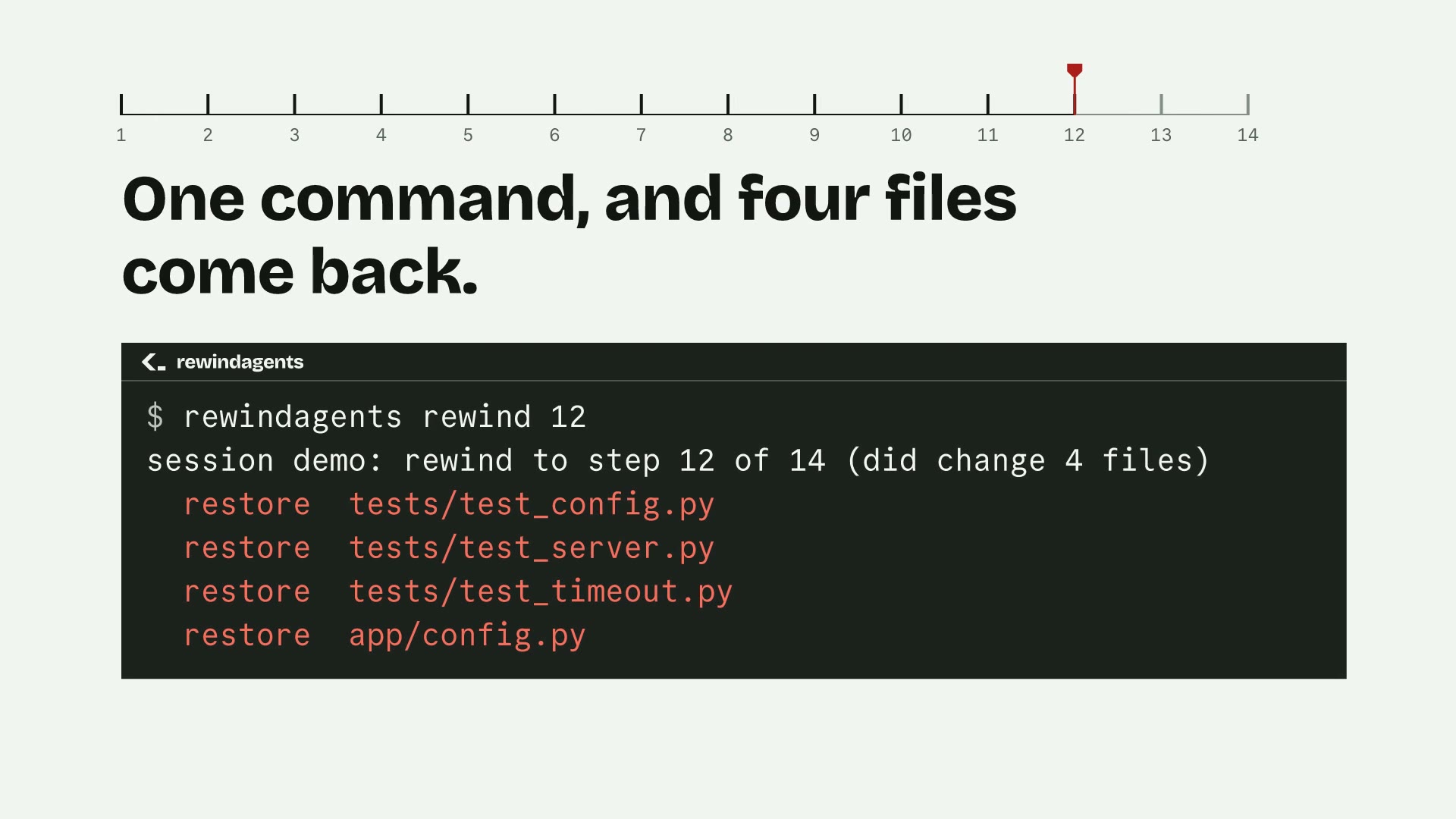
An agent works in a small project for 14 steps. Steps 13 and 14 delete the tests and overwrite the config. rewindagents rewind 12 puts the files back the way they were right after step 12. The first 12 steps stay.
The session as text. First, every step the agent took.
# a coding agent has been working in this repo; rewindagents recorded every step
$ rewindagents replay
    1  Read          README.md
    2  Read          app/config.py
    3  Edit          app/config.py  [1 checkpointed]
    4  Read          app/server.py
    5  Edit          app/server.py  [1 checkpointed]
    6  Write         tests/test_timeout.py  [1 checkpointed]
    7  Bash          python3 -m unittest discover -s tests -t . -q
    8  Edit          app/server.py  [1 checkpointed]
    9  Bash          python3 -m unittest discover -s tests -t . -q
   10  Edit          README.md  [1 checkpointed]
   11  Bash          git status --short
   12  Read          tests/test_server.py
   13  Bash          rm -rf tests  [3 checkpointed]
   14  Write         app/config.py  [1 checkpointed]
Then the damage, the rewind, and the project after it.
# its last two steps deleted the tests and overwrote the config
$ git status --short
 M README.md
 M app/config.py
 M app/server.py
 D tests/test_config.py
 D tests/test_server.py
# put the files back the way they were right after step 12
$ rewindagents rewind 12
session demo: rewind to step 12 of 14 (did change 4 files)
  restore  tests/test_config.py
  restore  tests/test_server.py
  restore  tests/test_timeout.py
  restore  app/config.py
  this rewind is step 15; undo it with: rewindagents rewind 14 --session demo
# the tests are back; the first 12 steps stay
$ git status --short
 M README.md
 M app/config.py
 M app/server.py
?? tests/test_timeout.py03The timeline
The flight recorder for your coding agent.
See exactly what your agent did, step by step, with the diff each step made. Take back the whole session, one step, or one file, and preview the change before you make it.
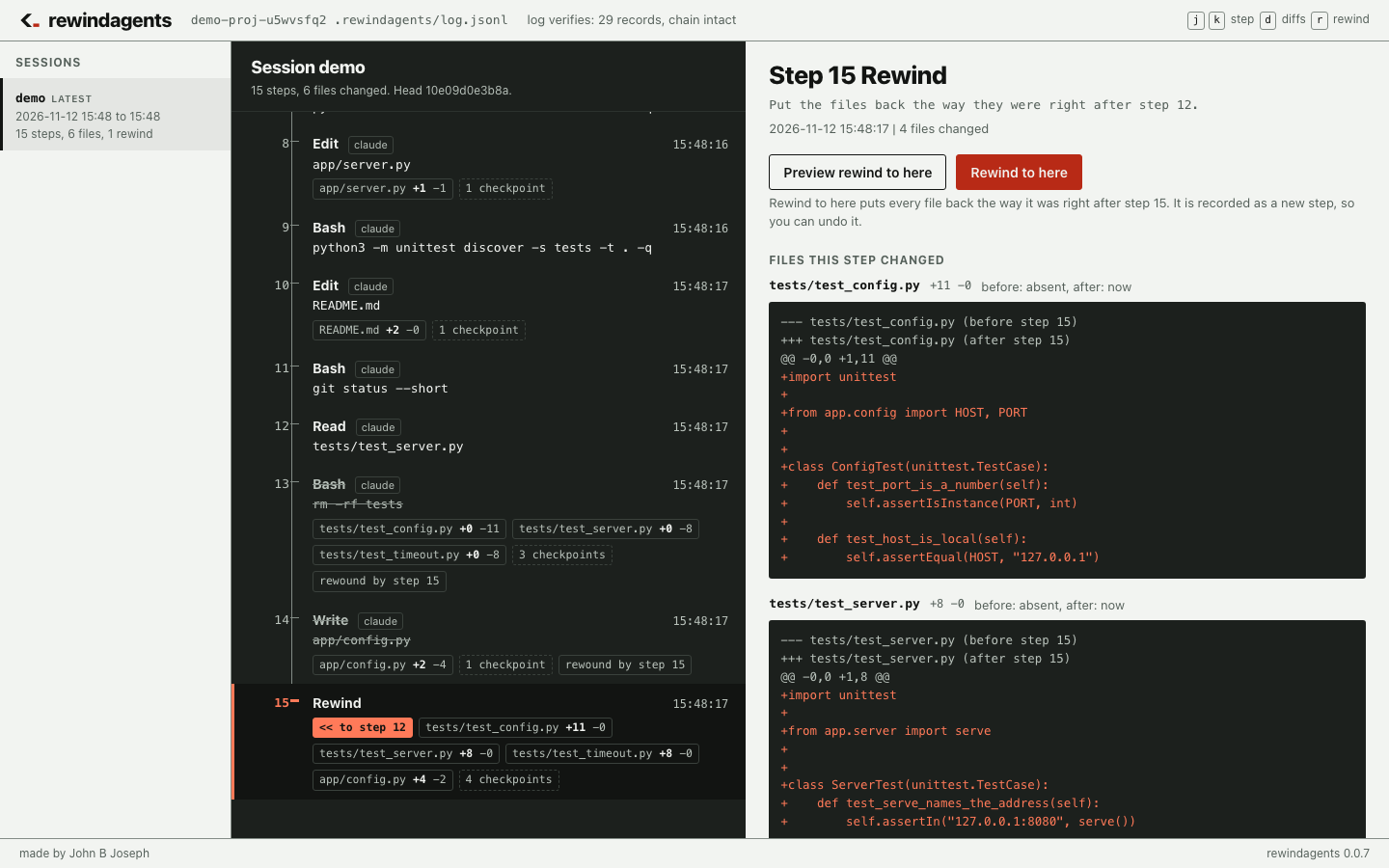
rewindagents ui on the demo session: steps 13 and 14 struck through, rewound by step 15. Local only, on 127.0.0.1, behind a one-time token.One command to set up
init finds the agents you have and adds the hook to each one, keeping every hook already there.
$ pipx install git+https://github.com/Johnbjoseph-cybersec/rewindagents && cd your-project && rewindagents init See it
The timeline in your browser: every step, every file, every diff. j k to move, r to rewind.
# opens the timeline in your browser; Ctrl+C stops it
$ rewindagents ui
Take back exactly what you mean
Preview a rewind as a diff, then take back the whole session or a single file. Every rewind is a new step, so it can be undone.
# what taking it back to step 12 would change
$ rewindagents diff 12
# take back just that file
$ rewindagents rewind 12 --only src/db.py04Install
Install, then add the hook to a project.
Python >=3.10. No dependencies beyond the standard library. Tested on Python 3.15 on macOS. Not on PyPI yet, so install from the repository. The docs walk through a first session.
Get the command
pipx installs it from the repository, as in the panel. From a clone, pip install . works too; without installing, PYTHONPATH=src python3 -m rewindagents runs the same CLI.
$ pipx install git+https://github.com/Johnbjoseph-cybersec/rewindagents
# or: pip install git+https://...
$ rewindagents --version
Add the Claude Code hook
$ cd /path/to/your/project
# adds the hook to .claude/settings.json in this project
$ rewindagents install
# or for every project
$ rewindagents install --settings ~/.claude/settings.json
Codex and Cursor hooks
# adds the hook to .codex/hooks.json in this project
$ rewindagents install --agent codex
# adds the hook to .cursor/hooks.json in this project
$ rewindagents install --agent cursor
# or for every project
$ rewindagents install --agent cursor --settings ~/.cursor/hooks.json
install keeps everything already in the file and does nothing if the hook is already there. For Codex the file is .codex/hooks.json and for Cursor .cursor/hooks.json; those two hooks are tested with the payloads in the vendors' documentation, not yet in a live session. .rewindagents/ gets its own .gitignore, so the log and the copies stay out of your commits.
05How it works
Record. Checkpoint. Rewind.
A hook runs before and after every tool call the agent makes. It never stops a call and never changes one: it always exits 0, even when its own input is broken or the disk is full, and prints nothing but the one answer Cursor requires from a permission hook.
Record
Every call gets a
prerecord (tool and input) and apostrecord (tool and response) in.rewindagents/log.jsonl. Each record carries the SHA-256 of the one before it, so editing, deleting or reordering any record makesverifyfail and name the first bad record. Appends are locked, so several processes can write to one log.Checkpoint
Before
Write,Edit,MultiEditandNotebookEdit, the current bytes of the target file go to.rewindagents/objects/<sha256>. Around aBashcommand, the project's files are saved first and scanned after, and only the files the command changed, created or deleted are checkpointed. Copies are stored by hash, so an unchanged file is stored once.Rewind
rewind Nputs back every file a later step changed and deletes the files later steps created. It first checks the hash chain and the hash of every stored copy; if the chain is broken it changes nothing. A rewind saves the current files and records itself as a new step, so a rewind is undone with another rewind.
06Tested
The claims on this page are tests.
Each row is a claim made above and the test in the repository that checks it. The site build stops if a test named here no longer exists.
- Every line in the fork and compare panels is what
ux-review/try-runs.shprinted.tests/test_runs_demo.py test_every_ quoted_ line_ is_ what_ the_ script_ prints forkrebuilds the step's files and leaves the project, itsHEADand index alone.tests/test_runs.py test_fork_ holds_ the_ files_ as_ they_ were_ right_ after_ the_ step_ and_ leaves_ the_ project_ alone - An agent in the run records into the run's own log, not the project's.tests/test_runs.py test_
an_ agent_ in_ the_ run_ records_ into_ the_ run_ not_ into_ the_ project compare --checkruns your command in each run and reports its exit code.tests/test_runs.py test_check_ runs_ in_ each_ run_ and_ reports_ its_ exit_ code compare --diffis a diffgit applytakes: the first run's files become the second's.tests/test_runs.py test_diff_ between_ two_ runs_ applies_ with_ git - A tampered log or a step that cannot be rebuilt exactly is refused, and nothing is left behind.tests/test_runs.py test_
a_ tests/test_runs.py test_tampered_ log_ is_ refused a_ tests/test_runs.py test_step_ that_ cannot_ be_ rebuilt_ exactly_ is_ refused refusals_ leave_ nothing_ behind - Every terminal line on this page and in the clip is what the CLI printed.tests/test_demo.py test_
every_ tests/test_demo.py test_shown_ command_ replays_ exactly installed_ binary_ prints_ the_ rewind_ the_ clip_ shows - Editing, deleting or reordering a record makes
verifyfail.tests/test_log.py test_edited_ tests/test_log.py test_args_ detected deleted_ tests/test_log.py test_middle_ record_ detected reordered_ records_ detected - Records cut off the end are caught only against a pinned head.tests/test_log.py test_
truncated_ tail_ caught_ only_ with_ pinned_ head rewindrefuses a tampered log and changes nothing.tests/test_rewind.py test_tampered_ log_ is_ refused_ and_ nothing_ changes - A rewind can itself be rewound.tests/test_rewind.py test_
rewind_ can_ itself_ be_ rewound - A real
sedandrm, run through the installed command, are put back.tests/test_bashscan.py test_real_ sed_ and_ rm_ undone_ through_ the_ installed_ command_ path - The hook prints nothing and exits 0, even on garbage input or a store it cannot write.tests/test_hook.py test_
garbage_ tests/test_hook.py test_input_ exits_ zero_ silently unwritable_ store_ exits_ zero branchkeeps the current files without touchingHEADor the index.tests/test_rewind.py test_git_ branch_ keeps_ the_ current_ files_ without_ touching_ head_ or_ index - A file outside the project is never touched.tests/test_rewind.py test_
file_ outside_ the_ project_ is_ never_ touched
Run every test from a clone, with the README's command. The docs say which tests need the installed command.
$ python3 -m unittest discover -s tests -v07Limits
What it records, and where it stops.
The real behaviour and the real limit, from the code. rewind reports every file it could not put back and exits 1 if there was one.
- 4,000 charactersA tool response longer than this is cut in the log, with its full length noted.
- 20 MBA file over this size is noted and not copied, so it is reported and not restored.
- 20,000 filesA project with more than this many files is not scanned around
Bashcommands. The call is still recorded, andrewindsays the step was not scanned. - the project directoryOnly files inside it are scanned, saved or restored. In a git repository, the scan is what
git ls-files --cached --others --exclude-standardlists: tracked and untracked files, not git-ignored ones. Outside git, every file except under.git,.rewindagents,.venv,__pycache__,node_modules,venv. - symlinks, directoriesSymlinks are not saved. Directories created by later steps stay, empty, after a rewind.
- the end of the logA hash chain proves the records are unchanged relative to each other. It cannot tell that records were cut off the end or that the whole file was rewritten and re-hashed. Pin the head hash somewhere the agent cannot write and check against it with
verify --head.
08Commands
Six commands. All of them local.
Run them from the project directory, the one holding .rewindagents/. They work on the latest session unless you pass --session ID.
Replay, rewind, branch
branch N --name X keeps the current files and, in a git repository, commits the whole working tree to rewindagents/X through a temporary index, so your HEAD, index and current branch stay as they were.
# one line per step: number, tool, file or command
$ rewindagents replay
# step 12 in full: input, checkpoints, result
$ rewindagents replay --step 12
# what would change
$ rewindagents rewind 12 --dry-run
# the same files, as a unified diff: now -> step 12
$ rewindagents diff 12
# only that file (a directory means every file under it)
$ rewindagents diff 12 src/db.py
# files back to how they were right after step 12
$ rewindagents rewind 12
# put back only these
$ rewindagents rewind 12 --only src/db.py --only tests/
# keep the current files, then rewind to step 12
$ rewindagents branch 12 --name try2
Export a replay
One HTML file with every step, its input and result, and for every file a step touched, the change that step made as a unified diff. Inline CSS only, no scripts, nothing fetched, the project's path not in the page. A file over 256 KB is described, not diffed; a diff longer than 400 lines is cut, with the count left out.
# writes .rewindagents/replay-<session>.html
$ rewindagents export
# a given session, to a given file
$ rewindagents export --session abc --out replay.html
# steps, tools and paths only: no inputs, results or diffs
$ rewindagents export --no-contents
# keep secrets as recorded (they are replaced by default)
$ rewindagents export --no-redact
Find a session
One line per session: id, first and last time, steps (with how many are rewinds), files touched. The latest session is marked. --grep keeps the sessions with a step whose command, file or input mentions the text, and lists those steps with their numbers.
# every session in the log: id, first and last time, steps, files touched
$ rewindagents sessions
# only sessions with a step that mentions it, and those steps
$ rewindagents sessions --grep config.py
Verify the chain
Checks every record against the one before it and names the first bad one. With --head, also catches records cut from the end.
$ rewindagents verify --head <pinned-hash>09Pricing
The tool is free. Cloud is planned.
Everything that exists is open source under Apache-2.0. A paid tier may come later; nothing is sold before it exists.
Open source Apache-2.0
Everything the tool does today.
- The recorder and hooks for 7 coding agents: every tool call in a hash-chained log, every file saved before it changes
forkany recorded step andcomparethe runs, with your own--checkreplay,rewindandbranch, andverifyagainst a pinned headexport: one session as one HTML page, with the diff each step madesessions: every session in the log, and search by command or path- Runs on your machine. Standard library only. No account.
Cloud planned
Hosted and opt-in, for teams; the local tool never needs it. Not for sale yet. No price has been set, so none is shown. If you want it, open the waitlist issue on GitHub and say what you would pay for.
- A shared page per comparison, linkable from a pull request or a chat
- Saved starting points run in parallel cloud sandboxes, so ten attempts do not occupy a laptop
- A team's comparison history across repos and people: which agent, model or prompt wins on which kind of task
- Scheduled re-runs of a team's starting points when a model, prompt or CLAUDE.md changes, with a report of what got worse
- Retention, SSO, seats: the things an organisation buys
Details on the pricing page.
10Questions
Questions.
Does it stop or change what the agent does?
No. The hook records and checkpoints, then exits 0. It has no opinion about any call. The agent runs exactly as it would without the hook; the difference is that afterwards every step is on record and every file change can be put back.
Does anything leave my machine?
No. rewindagents makes no outbound network connections: a test checks that no module under src/ imports socket, http or urllib, except the timeline UI, which serves rewindagents ui on 127.0.0.1 only and checks a one-time token on every request. The log and the file copies live in .rewindagents/ inside your project, and nothing reads them but you.
Which agents does it work with?
Claude Code, through its PreToolUse and PostToolUse hooks; Codex, through the same hook file shape in .codex/hooks.json; Cursor, through .cursor/hooks.json. The Claude Code hook has run in real sessions. The Codex and Cursor hooks are built from the vendors' hook documentation and tested with the documented payloads, not yet in a live session; the README says the same.
Does it need git?
No. Recording, replay and rewind work in any directory. Git changes two things: around Bash commands the scan follows git ls-files, so git-ignored files are left alone, and branch commits the current files to a git branch. Outside git, branch keeps them in the log only.
What happens if the log is tampered with?
verify names the first record that does not match the one before it, rewind changes nothing, and export still writes the page, with a notice naming the bad record, and exits 1. Records cut off the end are only caught against a pinned head hash.
Is it free?
Yes, under Apache-2.0: the recorder, the hook, replay, rewind, branch, export and sessions. A paid Cloud tier is planned and nothing is sold before it exists.
Install it, add the hook, carry on.
$ pipx install git+https://github.com/Johnbjoseph-cybersec/rewindagents
# or: pip install git+https://...